Vibe Coding Experiments: 5 Personal Tools I Built Without Writing a Line of Code
If you’ve been following AI news for the past year, you’ve probably been hearing the term “vibe coding” more and more. You might be wondering what it is or whether it’s worth trying. The short answer: Yes — even if you’ve never programmed a line of code in your life.
Vibe coding is when someone describes a software solution using natural language prompts in an AI tool, and the large language model codes, debugs, and refines a new application. You can do this in everyday AI chatbots like Claude, ChatGPT, and Gemini, or in dedicated vibe-coding tools like Cursor and Lovable.
Much of the time, vibe coding comes up in a business context; for example, a startup founder with no programming experience might launch a new app. You might have seen such stories and dismissed vibe coding as something only for businesses or the tech industry. However, since summer 2024, I’ve increasingly turned to AI to vibe code tools for personal use.
To inspire others, I thought I’d share five tools I built for my hobbies without writing a line of code (plus one bonus example).
Fair Warning: I was in software engineering for over 20 years. The first 10 years, I was a hands-on web app developer (HTML, CSS, JavaScript, C#, etc.). After that, I held managerial roles, overseeing front- and back-end web developers as well as iOS and Android mobile app engineers. Hence, I probably feel less intimidated to try vibe coding than someone without a technical background. Even so, I never programmed in Python, which is the language I’ve used most often for vibe coding.
Web Log Analyzer For My Personal Websites
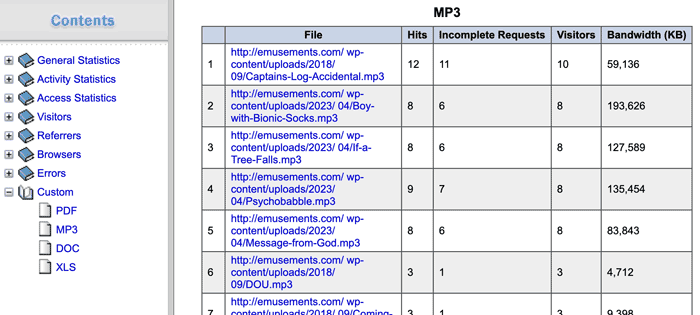
I’ve had personal websites for my various creative projects since the mid-1990s. For most of that time, I’ve downloaded the server logs for my sites and used offline web log analyzer tools to track visitor behavior, including several custom reports not readily available in tools like Google Analytics. For example, the number of MP3 listens or downloads for my audio dramas.
Dedicated offline weblog analyzers are extremely uncommon. Most tools for analyzing web traffic run on a server and are intended for enterprise users. They’re also hopelessly complex (which is one reason so many people use Google Analytics). Luckily, on Windows, one such program existed: Weblog Expert. The application was relatively easy to set up, and creating custom reports was simple.
However, after several years, I ran into two problems with this solution. First, the developer had put the program on life support. Second, I decided to switch from Windows to macOS.
In June 2024, a few months before buying a Mac, I searched for similar tools that’d run on macOS and found nothing.
I had a thought. What if I tried writing a Python script to analyze my downloaded web log files and generate CSVs for the custom reports I needed?
Then, I had another thought. I’d recently started using ChatGPT for information gathering (as an alternative to Google searches). Could ChatGPT generate the script for me? Only one way to find out…
I can’t recall the prompt or much about the process since I can no longer find the chatbot thread. (Maybe it was anonymous?)
The generated Python script freed me from a dependency on Weblog Expert, but it had some limitations that made using the tool cumbersome.
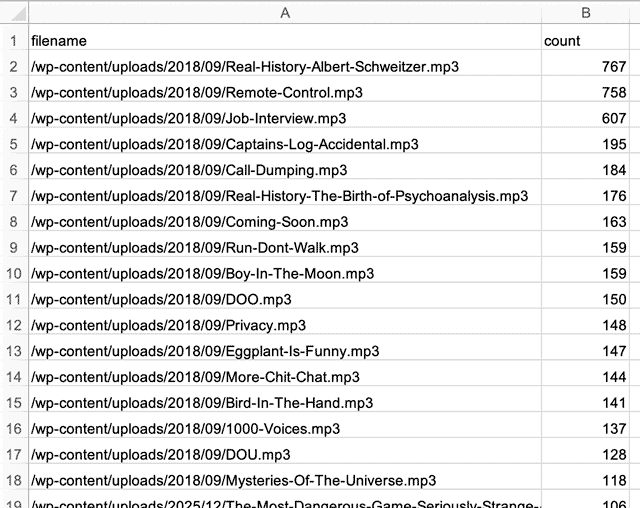
I started running this script monthly on my Windows laptop. After I switched to macOS in November 2024, I started running it on a MacBook Pro. By then, I’d become aware of Claude as a popular vibe coding tool. I decided to see if the chatbot could iterate on the script to solve the problems in version 1. Here was my initial prompt:
The Python script below takes a web log gzip file, deflates it and produces a report. The original web logs are individual gz files which I manually deflate, concatenate and then recompress as gz. If possible, I’d like to revise the script to avoid those steps, so that it internally concatenates the individual gz files and then analyzes the data on the merged data set. (Note: I’m running this on Thonny on a Mac – Python 3.10.11)
This turned out to be a trivial task for Claude, and — snap — all the problems were solved.
Postscript: While writing this post, I discovered that Weblog Expert has left hospice and is now officially dead.
Ghost Hunting In A Pickleball WhatsApp Group
On a volunteer basis, I coach newbie pickleball players twice a week at a local park. We use WhatsApp to communicate with students and Google Sheets to track their progress through the four-month program.
The problem: Some students drop out without notifying us, leaving the WhatsApp group cluttered with ghost members (or lurkers) when it’s meant for active students only.
I decided to do some housecleaning and remove the lurkers. The first challenge is that WhatsApp doesn’t offer a way to export a list of group members. So I turned to a Chrome extension called WAExport to generate a CSV of the phone numbers.
I knew I could perform some spreadsheet formula trickery to identify which students in the spreadsheet were currently members of the WhatsApp group. But out of laziness about figuring out the formulas, I decided to vibe code a comparison tool instead.
I turned to Claude, thinking it would produce a script to compare two CSV files. Instead, it created an inline tool with inputs to upload two CSV files. The tool compares them and outputs a new CSV file with matches.
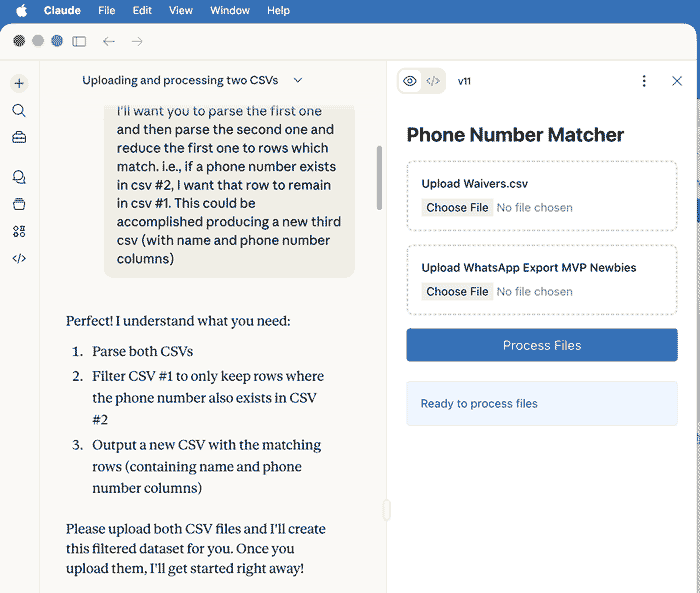
When you generate content in Claude (such as code, documents, websites, and diagrams), they become “artifacts” — and you can find your artifacts later via the side menu.
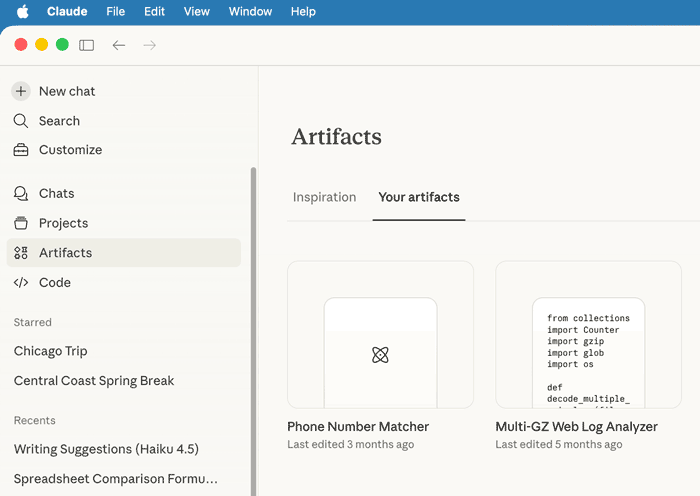
This tool proved to be of little use — not because of any flaw in Claude’s work, but because I realized a different approach would better solve my problem. However, I’m including it to highlight that vibe coding can produce user-friendly, interactive tools. It’s not limited to producing programming code that you have run outside of the chatbot. I suspect most people trying to create personal tools wouldn’t know how to run a Python script on their Mac or PC.
I queried Claude about how it thinks about this issue:
Question: What is the general guidance for when it makes more sense for you to create an inline tool vs. a script that a user would run outside of Claude?
Answer: In general, inline tools work best for interactive, one-off tasks where simplicity and accessibility matter, while scripts are better suited for repetitive, high-volume, or technically complex workflows.
I think it’s obvious that personal tools are more likely to fall into the first category.
Getting back to the problem (ghostbusting in the pickleball lessons WhatsApp group), really, all I needed was a spreadsheet column to flag whether each student’s phone number appeared in the WhatsApp CSV. To achieve this, I needed some help with spreadsheet formulas, a task that’s trivial for a chatbot.
First, I needed a formula to standardize (clean up) the phone numbers, so that comparisons wouldn’t break if the number formatting differed between the student roster spreadsheet and the WhatsApp CSV file.
Claude offered:
=IF(LEN(REGEXREPLACE(A2,"\D",""))=10, "1"®EXREPLACE(A2,"\D",""), REGEXREPLACE(A2,"\D",""))I hate writing regular expressions, so I’m happy to offload that chore to an AI.
Second, I needed a formula to look up whether the standardized phone number appeared in the WhatsApp CSV.
=IF(K2="","?",IF(COUNTIF('WhatsApp Members'!C:C, K2)>0,"Yes","No")) With these formulas in hand, the rest was easy. Below is how the conditional column appears in Google Sheets.

The specifics of this example aren’t important, except to illustrate that AI chatbots are a fantastic way to generate spreadsheet formulas quickly (especially compared to my previous method of searching the web for tutorials and tips). I don’t know if this counts as “vibe coding” — but I’m vibing with it.
Column Browser for My Music Catalog
In late December 2025, I experienced a disaster in Apple Music: most of my music library disappeared!
After several failed recovery attempts, I decided to rebuild my music collection in Apple Music from scratch. Since I’d be re-adding albums directly from the Apple Music catalog, I needed a list of all my albums as a reference.
The good news was that I had an XML export of my music library from before the problem happened. If you’re not a programmer, you might not know that XML (Extensible Markup Language) is optimized for computer programs to manage data and isn’t exactly human-friendly, especially for large data sets.
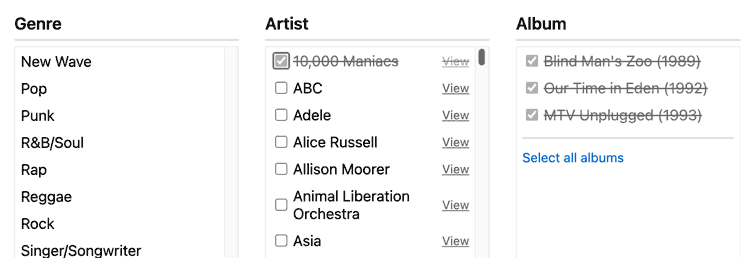
I needed to convert the XML into a more friendly format. I turned to ChatGPT this time, as I tend to bounce between different AI tools. I asked it to generate a Python script to convert the XML file into an HTML page that would mimic the Column Browser in the macOS Apple Music App.
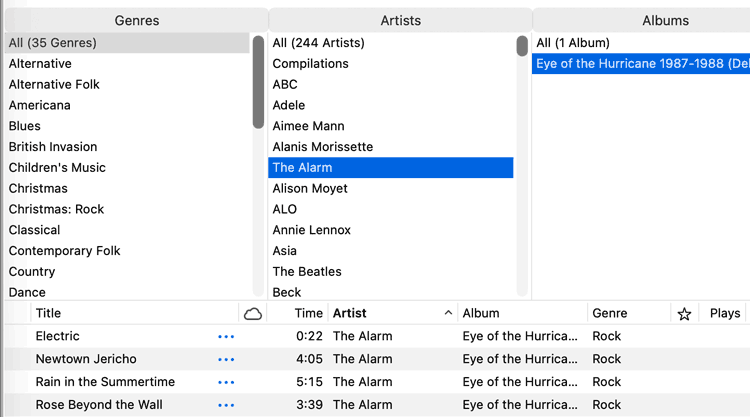
I brainstormed with the chatbot about possible features, and it iterated several versions of the script until the browser had everything I needed.
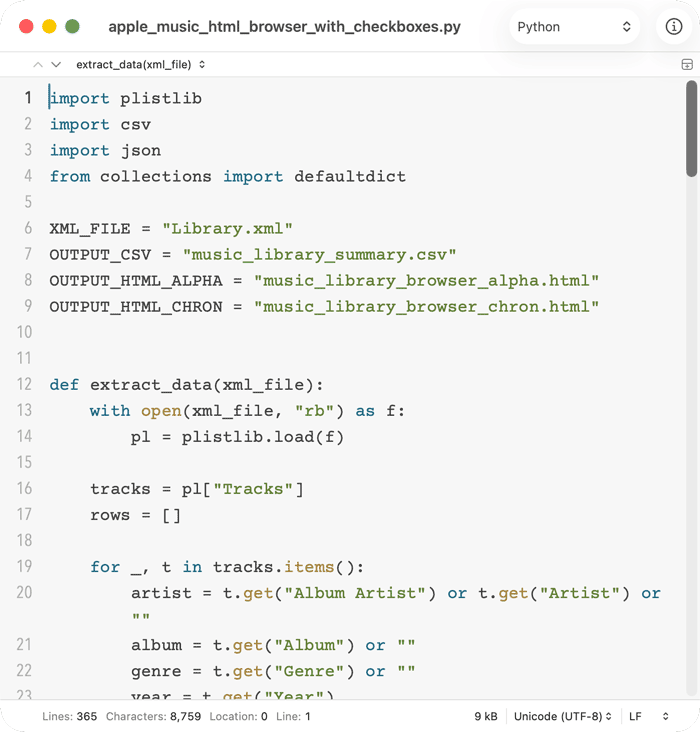
The HTML column browser was instrumental in helping me rebuild my music collection in Apple Music.
For the full saga of my misadventures with Apple Music, see my previous post: Rebuilding My Corrupted Apple Music Library: Lessons from Using AI Tools.
Apple Music Playlist Exporter
After I finished reconstructing my music collection in Apple Music, I vowed to protect myself against future music library disasters.
One key practice: regularly backing up my music collection.
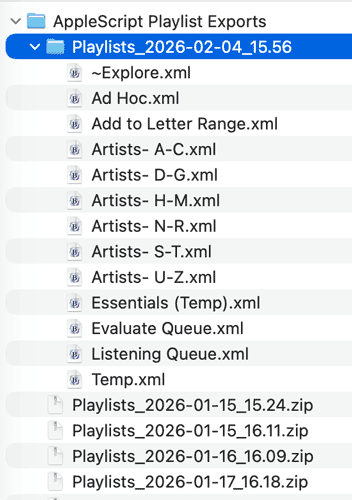
The solution I settled on was to export my Playlists directly from Apple Music to XML files. You can do this manually via “File menu > Library > Export Playlist…” The problem is that you can export playlists only one at a time, and my music collection has six core playlists. I wanted to automate the process.
Since I’d already been discussing backup options with ChatGPT, I asked the chatbot to create a script to export all my playlists to XML and then zip them into an archive. It advised me that this was possible only via an AppleScript (which was fine by me).
ChatGPT struggled to get the solution right. The AppleScript kept generating errors when I’d run it. I’d copy and paste each error into the chatbot, and it would debug the problem. Slowly but surely, it ironed out all the issues.
This trial-and-error process is pretty typical of vibe coding — you don’t always get it right on the first try. In fact, the chatbot generated ten major versions of the script (plus countless minor tweaks) to reach a working version. According to ChatGPT, AppleScript is a lot trickier to get right than Python. Glad I didn’t try to code it by hand!
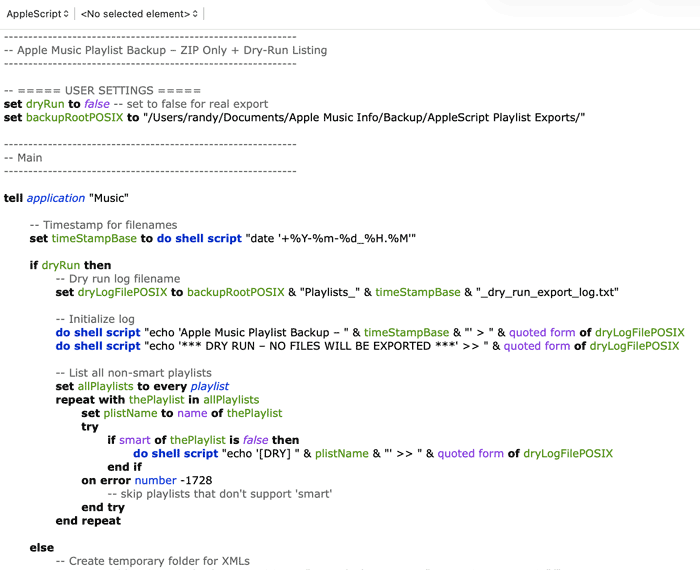
I run this AppleScript weekly, or any time I make changes to my collection.
New Album Checker
While rebuilding my music collection in Apple Music, I discovered that many of my favorite artists had released new albums I wasn’t aware of. I really needed a better way to track new releases. So, I consulted Claude.
By this point in my vibe coding experience, I had settled on Claude as my default chatbot for generating tools. Three reasons for this: Claude’s reputation for excelling at coding, my own experience so far, and my preference for the corporate practices of its parent company, Anthropic (compared to some of its competitors).
Below was my initial prompt:
I’m looking for a way to track new releases by musical artists in my curated music collection (in Apple Music). For many years, I’ve subscribed to AllMusic’s weekly new release newsletter, but that’s not the best mechanism for my goal. I look only at the highlighted albums at the top, and most releases are not by artists in my collection.
I’d like to specify a list of artists and be notified when they have new albums. I’m open to existing apps, but I suspect a custom app (or Python script) might be needed. Ideally, I’d import a list of artists and then get notifications. Or even better, get a report with results since the last run (or since a specified date). What are some ways I could accomplish this?
Claude suggested several apps (including MusicHarbor) that would fit my goal. Unfortunately, the way I organize my songs in Apple Music (in Playlists rather than in the Library) prevented me from trying any of them. So, we decided on a Python script instead.
I suggested that the script could use my playlist backup XML files to derive the list of artists in my collection. Claude confirmed this approach and mentioned that MusicBrainz (an open music encyclopedia) had a free API that the script could use to look up albums by artists.
Claude got busy creating the Python script. A few seconds later … we had a first draft. As usual with vibe coding (or any software engineering, for that matter), we went through several cycles of code > test > debug > enhance > re-test.
The first time I ran the script, the resulting report impressed me. Even so, I found several areas to improve.
Ran the script. Worked great. Some ideas for improvement. Let’s brainstorm before you revise it.
1) Can the output be broken into 2 sections? 1 new releases; 2 artists not found on MusicBrainz?
2) Is it possible to filter out re-issues? e.g., Sting The Last Ship is not a new album. Either filter these out or separate new releases into 2 sections: 1) true new releases. 2) re-releases.
3) Some surprising artists not found. e.g., The Traveling Wilburys, The English Beat, The B-52’s, John Lennon & Yoko Ono, and more
The main problem we needed to resolve was the 50+ artists not found on MusicBrainz. The solution was for the script to use “fuzzy logic” matching while looking up each artist. In other words, to try several variations on an artist’s name to increase the chances of a match. With these changes, the tool reduced the number of unfound artists to just seven!
Thinking like a programmer (since I once was one), I asked Claude if the script could be self-improving and remember the official MusicBrainz artist names for subsequent runs. Claude suggested an “artists_mappings.json” file where the script could store the matches for future use. Even better, I could also manually add entries to the list.
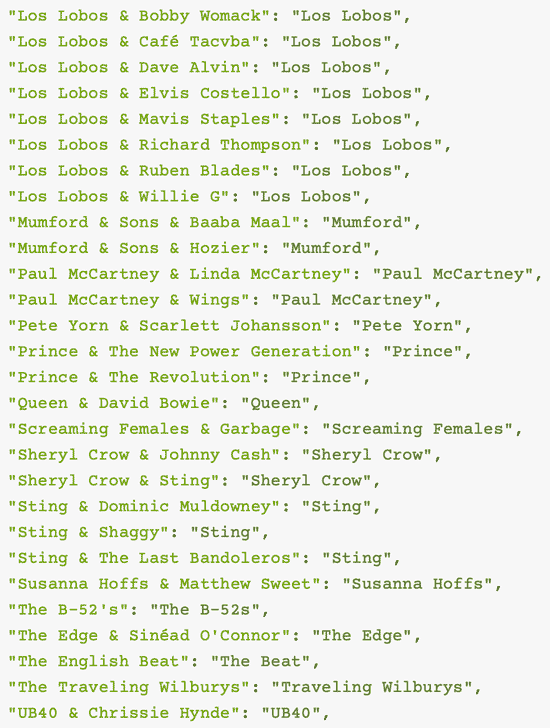
Looking at the mapping list, my programming brain kicked in again. I noticed something that might slow down the script, especially since the MusicBrainz API allows only one request per second for unauthenticated API calls (i.e., the script can look up only one artist per second).
In the JSON, patterns of unfound can be many-to-one. For example, several patterns map to: Los Lobos. Does the script redundantly look up Los Lobos in this case (which is a waste of API calls)?
Claude confirmed the design flaw and suggested adding an in-memory cache to remember which artists it has already looked up in MusicBrainz during each run of the script. For example, the list contains eight variations of “Los Lobos & [Guest Artist]” that all resolve to “Los Lobos.” After checking for new albums by Los Lobos the first time, the script ignores the remaining seven variations that also map to “Los Lobos.”
By the end of our testing and improvement iterations, the final tool would rely on several files (most of which I’ve already described). Helpfully, Claude provided previews in the chat of what the folder contents would look like on my Mac.
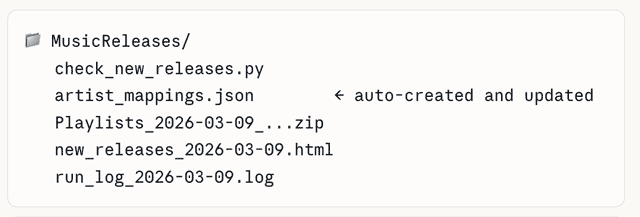
Claude dazzled me during this project. I didn’t offer any guidance about how the New Album Releases web page should look. Independently, the chatbot designed an elegant user interface with several nice formatting touches.
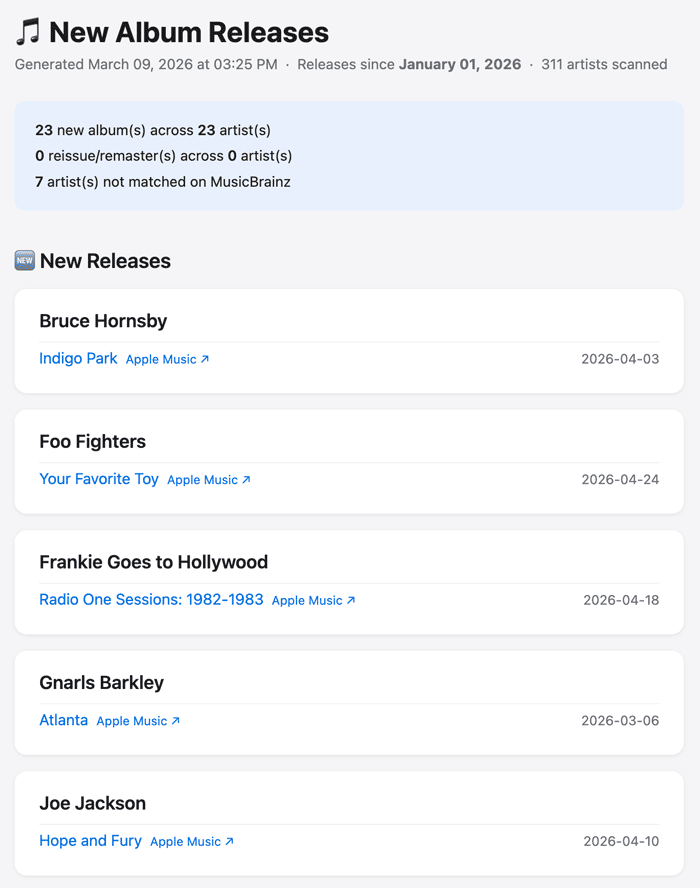
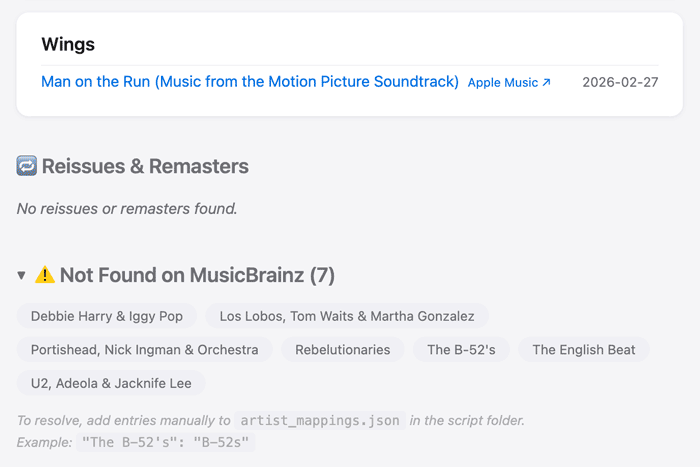
My New Album Checker exemplifies just how personal yet universal vibe-coding tools can be. I created the tool to solve a problem specific to my quirky music setup; however, anyone with a list of favorite artists could use or adapt it.
Another takeaway is that while anyone can use chatbots to generate tools, software development experience helps with refining design and performance — and that’s where my technical background came in handy. However, my guess is that, in the near future, Claude and similar AI tools won’t need human feedback to identify the concerns I raised about API performance.
If you’re technically inclined, what you can accomplish with vibe coding is nearly limitless — unfortunately, for software engineers — as my final example shows.
Bonus Example: Coral Data Analyzer
My last example isn’t a personal tool, but it illustrates the next level of vibe coding. In contrast to general-use chatbots (like ChatGPT and Claude), it leverages Cursor, an AI-assisted integrated development environment app for Windows, macOS, and Linux. Imagine a regular software development coding tool like PyCharm or VS Code (on which Cursor is based) supercharged with AI.
During her winter break, my daughter (a junior in college) set up Cursor on her Mac and wanted to vibe code a web application related to climate change and coral reef health. She asked if I could help her get started with the app, since it has a steep learning curve if you don’t have a computer science background. As a former software engineer, I was able to figure out how Cursor worked relatively quickly.
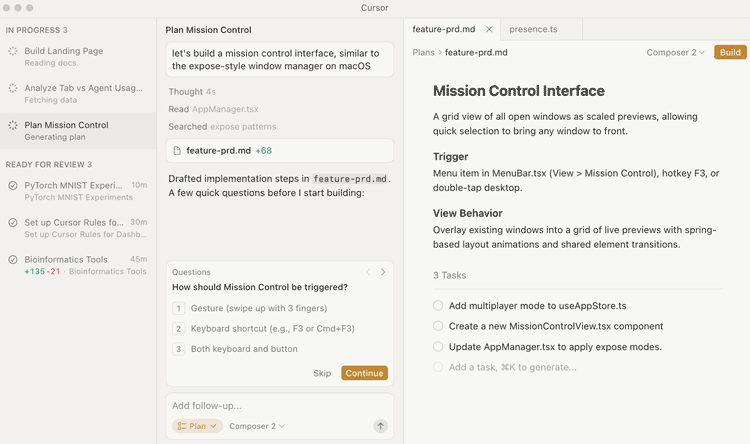
The vibe coding workflow has several steps. (Note: I just dipped my toe in the water with Cursor, so my impressions are likely just the tip of the iceberg — to mix metaphors.)
Prompt & Brainstorm
This first step is just like using any AI chatbot. You start with a prompt to introduce a topic or ask a question (in this case, to describe a piece of software you want to develop). Then, you have a back-and-forth brainstorming discussion to flesh out all your requirements. In some cases, this will include decisions about whether the software should be a script, a web app, a desktop app, a mobile app, or even an API or database.
Technical Design
Once Cursor has all the information it needs, it proposes a technical design for the software. In my daughter’s case, her web app would require web pages, an API, and a database. If you’re technically inclined, you might have feedback and suggest changes.
Buildout
When you’re satisfied with the technical design, Cursor composes the solution, which may take anywhere from a few seconds to an hour, depending on the complexity of the system you’ve requested.
Review & Test
After Cursor finishes generating the software solution, you can play with it and see how well it works. In my daughter’s case, the initial results were promising enough to warrant further development.
For a complicated project, you’d likely cycle through each of the phases several times before reaching a beta version of your software.
One limitation of Cursor is that it doesn’t include any infrastructure to host the applications it builds. Other AI-powered integrated development environments, like Replit, GitHub Spark, and Lovable, include native hosting systems.
But with Cursor and tools like it, which are intended more for professional software developers, we’re getting further into the jungle than most personal tool vibe coders would want to venture.
Note: for yet another bonus vibe coding example, you can read about a Python script I generated in Gemini during my Apple Music catalog rebuild. I excluded the script from this post because, while it did what it was supposed to, it didn’t lead to a positive outcome.
Final Thoughts
The examples I’ve described illustrate how easy it is to try vibe coding, even without a technical background. The tools are only getting better and more accessible — I expect the gap between “I have an idea” and “here’s the working tool” to keep shrinking.
If you want to see how far the rabbit hole goes, non-coders like Chris Hutchins of the All The Hacks podcast are already building full apps and exploring autonomous AI agents. But you don’t have to go that far — I hope my examples inspire you to think about simpler personal tools you might build.
Postscript
My examples didn’t include creating a personal website, which is a common use case for vibe coding. (I haven’t tried it out myself since I’m proficient at WordPress.) However, as I was editing this post, PCWorld published a story that offers a glimpse into what vibe coding a website looks like: I built a personal web page with AI in 5 minutes. You can too!
Your Turn
If you’ve tried vibe coding yourself — or if this post nudges you to give it a shot — I’d love to hear about it in the comments.
Note: Comments are moderated, so there may be a delay before your comment appears.